Demystifying Computational Fluid Dynamics (CFD) for Engineers
Computational Fluid Dynamics (CFD) is an invaluable tool in the modern engineer’s arsenal, transforming how we design, analyze, and optimize systems involving fluid flow and heat transfer. From predicting airflow over an aircraft wing to understanding blood flow in arteries, CFD provides a virtual laboratory for complex fluid phenomena. It’s a cornerstone across diverse fields like Aerospace, Oil & Gas, Biomechanics, and process engineering.
While often perceived as daunting, a practical understanding of CFD principles and workflows empowers engineers to make informed decisions, reduce prototyping costs, and accelerate product development cycles. This guide aims to cut through the academic jargon, offering a clear, actionable roadmap for leveraging CFD effectively.

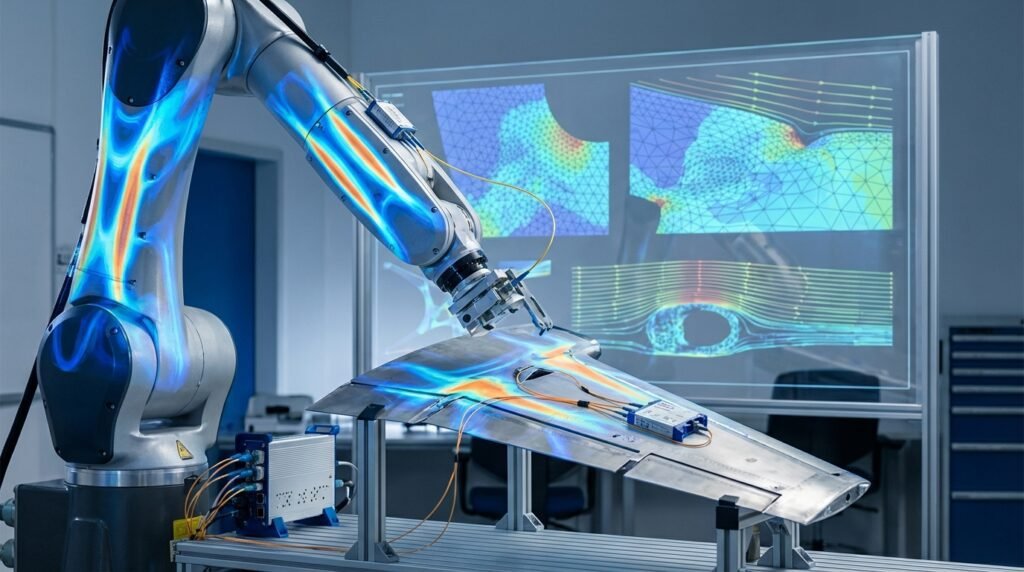
Image: Aerodynamics CFD simulation of an aircraft wing – vertical view by KUKA Systems GmbH.
What Exactly is CFD?
At its core, CFD is the branch of fluid mechanics that uses numerical methods and algorithms to solve and analyze problems that involve fluid flows. Computers are used to perform the calculations required to simulate the free-stream flow of the fluid, and the interaction of the fluid with surfaces defined by boundary conditions. It’s essentially solving the governing equations of fluid motion (like the Navier-Stokes equations) on a discrete grid, yielding insights into velocity, pressure, temperature, and other fluid properties throughout a domain.
Why CFD Matters in Modern Engineering
- Cost Reduction: Minimize physical prototypes and expensive experimental testing.
- Faster Design Cycles: Rapidly iterate on designs and evaluate performance changes.
- In-depth Understanding: Visualize and quantify flow phenomena that are difficult or impossible to observe physically.
- Optimization: Fine-tune designs for peak performance, efficiency, or safety.
- Safety & Risk Assessment: Predict potential hazards, such as pollutant dispersion or fire spread.
The Practical CFD Workflow: From CAD to Insight
A successful CFD simulation hinges on a methodical approach. Skipping steps or cutting corners can lead to inaccurate or misleading results. Here’s a typical workflow:
1. Problem Definition and Objectives
Before touching any software, clearly define what you want to achieve. What are the key questions you need to answer? What outputs are critical? Example: Optimize a manifold for uniform flow distribution, or predict pressure drop across a valve.
2. CAD Geometry Preparation
This is often the most time-consuming step. Real-world CAD models are rarely ready for CFD directly. Simplification is key:
- Remove Irrelevant Features: Small fillets, chamfers, bolt holes, and textual engravings often don’t influence the main flow and add unnecessary mesh complexity.
- Close Gaps: Ensure a watertight volume for the fluid domain. Even tiny gaps can prevent successful meshing.
- Extract Fluid Volume: For internal flows, you often need to create a new solid body representing the fluid region from your existing CAD geometry. Tools like CATIA or your CAD package’s surfacing capabilities are useful here.
3. Meshing: Discretizing the Fluid Domain
Meshing divides your fluid volume into tiny, interconnected cells (elements). The quality and density of this mesh profoundly impact simulation accuracy and computational cost.
Mesh Types:
- Structured Meshes: Highly organized, often hexahedral (brick) cells. Excellent quality but challenging for complex geometries.
- Unstructured Meshes: More flexible, often tetrahedral or polyhedral cells. Easier to generate for complex shapes but can require more cells for the same accuracy.
- Hybrid Meshes: Combine structured elements (e.g., prism layers near walls for boundary layer resolution) with unstructured elements in the bulk flow.
Key Meshing Considerations:
- Resolution: Finer mesh in regions of high gradients (e.g., near walls, wakes, jets). Coarser mesh where flow is uniform.
- Aspect Ratio: Ratio of longest to shortest side of a cell. Keep it close to 1:1 in critical regions for accuracy.
- Skewness & Orthogonality: Measures how distorted a cell is. High skewness or poor orthogonality degrades solution accuracy.
- Boundary Layers: Crucial for wall-bounded flows (e.g., pipes, airfoils). Use prism/inflation layers to resolve steep velocity gradients near walls, especially when using turbulence models.
Software like ANSYS Meshing, OpenFOAM’s snappyHexMesh, or specialized meshing tools within Abaqus can assist in this complex process.
4. Physics Setup: Defining the Problem
This is where you tell the solver about the real-world physics of your problem.
- Fluid Properties: Density, viscosity, thermal conductivity, specific heat (constant or temperature-dependent).
- Boundary Conditions (BCs): Critical inputs for your simulation. Common BCs include:
- Inlet: Velocity inlet, mass flow inlet, pressure inlet.
- Outlet: Pressure outlet, outflow.
- Walls: No-slip (fluid velocity at wall is zero), slip (frictionless), moving wall, heat flux/temperature.
- Symmetry: Reduce computational domain for symmetrical problems.
- Turbulence Models: For most industrial flows, turbulence must be modeled. Popular RANS (Reynolds-Averaged Navier-Stokes) models include k-epsilon, k-omega, SST k-omega. Large Eddy Simulation (LES) or Direct Numerical Simulation (DNS) are used for highly detailed, transient studies but require immense computational power.
- Solver Settings: Choose steady-state vs. transient, pressure-velocity coupling scheme (e.g., SIMPLE, PISO), discretization schemes (e.g., first-order, second-order).
5. Solving and Post-Processing
Once everything is set up, the solver gets to work. This can take minutes, hours, or even days, depending on mesh size, complexity, and computational resources. This is where affordable HPC rental, such as those offered by EngineeringDownloads, can significantly accelerate your workflow for complex models.
- Monitoring Convergence: Keep an eye on residuals (measures of imbalances in equations) and monitor points (e.g., velocity at a specific location, pressure drop) to ensure the solution is stabilizing.
- Post-Processing: Extracting meaningful insights from raw data. This involves visualizations (contour plots, streamlines, vector plots) and quantitative analysis (integrating forces, calculating mass flow rates, pressure drops). Tools like ANSYS CFD-Post, ParaView (for OpenFOAM), or dedicated modules in Abaqus are used.
Verification & Sanity Checks: Trusting Your Results
A beautiful contour plot is meaningless if the underlying simulation is flawed. Verification (solving the equations correctly) and validation (solving the correct equations for the physical problem) are paramount.
1. Mesh Independence Study (Verification)
Run your simulation with progressively finer meshes. The key output (e.g., drag coefficient, pressure drop) should converge to a constant value. If results change significantly with mesh refinement, your mesh is too coarse.
2. Boundary Condition Sanity Check
- Visual Inspection: Display your boundary conditions on the geometry. Do they make physical sense? Are inlets/outlets correctly placed?
- Magnitude Check: Are velocity/pressure values realistic for the given application?
3. Convergence Criteria (Verification)
Monitor residuals and engineering quantities:
- Residuals: For most industrial applications, residuals typically need to drop below 1e-4 or 1e-5 for momentum, mass, and energy equations.
- Monitors: Track key output parameters (e.g., lift, drag, outlet temperature) to ensure they reach a steady state or follow a consistent trend for transient simulations.
4. Energy and Mass Balance (Verification)
For steady-state simulations, the mass flow rate in should equal the mass flow rate out. Similarly, energy entering should equal energy leaving. Most solvers provide these global balances, which serve as a critical check on solution quality.
5. Validation (Comparing with Reality)
Compare your CFD results against:
- Analytical Solutions: For simplified cases (e.g., laminar flow in a pipe), analytical formulas provide a direct benchmark.
- Experimental Data: Wind tunnel tests, PIV (Particle Image Velocimetry) measurements, or pressure sensor readings. This is the gold standard for validation.
- Published Literature: Compare against validated results from similar studies or benchmarks.
6. Sensitivity Analysis (Understanding Robustness)
Investigate how changes in input parameters (e.g., inlet velocity, material properties, turbulence model coefficients) affect your results. This helps understand the robustness of your design and the limitations of your model.
Common CFD Mistakes and How to Avoid Them
Even experienced engineers can stumble. Here are typical pitfalls:
- Ignoring Geometry Cleanup: Leads to poor mesh quality, failed meshing, or non-physical results.Tip: Dedicate ample time to CAD preparation. Use defeaturing tools in your CAD or meshing software.
- Poor Mesh Quality: Particularly high aspect ratio cells, high skewness, or insufficient boundary layer resolution.Tip: Always check mesh metrics. Invest time in refining critical regions and ensuring prism layer growth ratios are appropriate.
- Incorrect Boundary Conditions: Setting a pressure outlet where a velocity inlet is needed, or using wrong values.Tip: Double-check all BCs, visualize them, and consider their physical implications.
- Inadequate Convergence: Stopping the simulation before residuals stabilize or monitor points reach a steady state.Tip: Don’t just rely on residual targets; always monitor engineering quantities.
- Over-Reliance on Default Settings: While tempting, default solver settings aren’t always optimal for every problem.Tip: Understand the underlying numerical schemes and turbulence models you’re using.
- Misinterpreting Results: Believing colorful plots without critical evaluation.Tip: Always perform sanity checks. Do the results make physical sense? Are they aligned with basic fluid mechanics principles?
Leveraging Automation in CFD
For repetitive tasks, parametric studies, or complex pre/post-processing, automation is a game-changer.
- Scripting: Tools like Python and MATLAB are excellent for scripting pre-processing (geometry manipulation, mesh refinement commands in some solvers), post-processing (data extraction, custom plots), and running parametric studies by automating solver inputs.
- APIs: Many commercial CFD packages (e.g., ANSYS Fluent, Abaqus) offer APIs (Application Programming Interfaces) that allow external programs (like Python scripts) to interact with the solver, streamlining complex workflows and optimization routines.
Choosing the Right CFD Software
The landscape of CFD software is diverse, each with its strengths:
| Software Type | Examples | Key Strengths | Considerations |
|---|---|---|---|
| Commercial – General Purpose | ANSYS Fluent/CFX, Siemens STAR-CCM+, Abaqus CFD | Robust solvers, extensive models, user-friendly GUIs, strong support, CAD-CAE integration (e.g., with CATIA for geometry). | High licensing costs, steep learning curve for advanced features. |
| Open-Source | OpenFOAM | Free, highly customizable, active community, excellent for research and niche applications, Python/MATLAB integration for pre/post. | Steeper learning curve (command-line focused), less intuitive GUI, community support. |
| Specialized | ADAMS (MBD with FSI via co-simulation), Custom codes | Tailored for specific physics or applications, high fidelity for niche problems. | Limited scope, requires expert knowledge. |
Advanced Topics in CFD (Briefly)
- Multiphase Flows: Simulating mixtures of fluids (e.g., oil-water, gas-liquid), crucial in Oil & Gas and process engineering.
- Fluid-Structure Interaction (FSI): Coupling CFD with FEA (e.g., using ANSYS Mechanical or MSC Nastran/Patran for structural part) to analyze how fluid forces deform structures and how structural deformation affects fluid flow (e.g., aeroelasticity in Aerospace).
- Optimization: Integrating CFD into design optimization loops, often using adjoint solvers or genetic algorithms.
- High-Performance Computing (HPC): Necessary for large, complex, or transient models, enabling faster turnaround times. For those requiring significant computational power, EngineeringDownloads offers affordable HPC rental to run your models efficiently.
The Future of CFD: AI and Real-time Simulation
The field is continuously evolving. Artificial Intelligence and Machine Learning are increasingly being used to accelerate CFD simulations, build reduced-order models, and improve turbulence models. The drive towards real-time simulation for design optimization and even digital twins is pushing the boundaries of computational efficiency.
Continuous Learning and Professional Development
Mastering CFD is a journey. Continuously learning new techniques, exploring different software, and engaging with the engineering community are vital. For those looking to deepen their understanding, EngineeringDownloads provides specialized online/live courses and internship-style training programs, perfect for aspiring or experienced engineers tackling complex projects.
Conclusion
Computational Fluid Dynamics is more than just a software tool; it’s a powerful methodology that empowers engineers to innovate and solve some of the world’s most challenging problems. By understanding the practical workflow, meticulously verifying results, and avoiding common pitfalls, you can harness the full potential of CFD to drive engineering excellence. Embrace the learning curve, stay curious, and let fluid mechanics come alive in your simulations.