Finite Element Analysis (FEA) has revolutionized how engineers approach structural design and integrity assessment. For any aspiring or seasoned engineer working in fields like aerospace, automotive, oil & gas, or biomechanics, a solid grasp of FEA for stress analysis isn’t just an advantage—it’s a necessity. This comprehensive guide provides a practical, engineer-to-engineer perspective on mastering FEA for stress analysis, focusing on actionable steps, common pitfalls, and verification techniques.

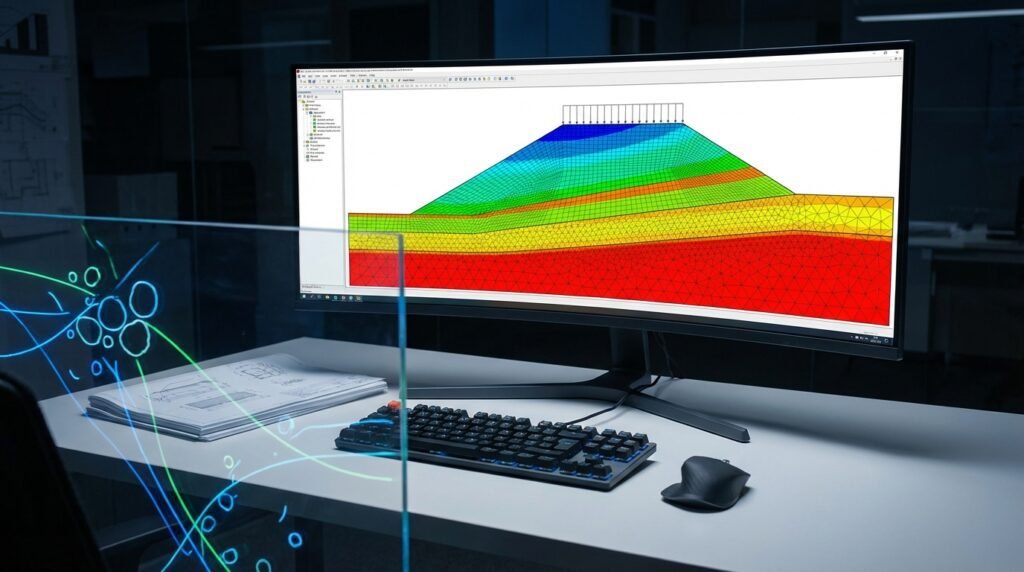
Image illustrating stress concentration in a bracket using Finite Element Analysis. (Source: Wikimedia Commons)
Understanding the Fundamentals of FEA for Stress Analysis
At its core, FEA is a numerical method used to predict how a product reacts to real-world forces, heat, vibration, and other physical effects. For stress analysis, it helps us understand how a component deforms and where stresses concentrate under applied loads. It breaks down a complex structure into many small, simple elements, solving equations for each, and then assembling them to represent the behavior of the whole structure.
Basic Principles: Discretization and Element Types
The journey begins with discretization: dividing your continuous physical model into a finite number of discrete elements connected at nodes. The type of element you choose significantly impacts accuracy and computational cost.
- 1D Elements (Beams, Trusses): Ideal for slender structures where cross-sectional properties can be averaged.
- 2D Elements (Shells, Plates): Suitable for thin-walled structures, offering a good balance between accuracy and computational expense.
- 3D Elements (Solids – Hexahedral, Tetrahedral): Used for bulky components where stress variation through the thickness is critical.
Each element has interpolation functions that approximate the unknown field variable (like displacement) within its boundaries using the nodal values. The more complex the element, the higher the order of the interpolation function, potentially leading to greater accuracy but also higher computational demand.
The Power of the Stiffness Matrix
For each element, FEA software formulates a stiffness matrix, which relates nodal forces to nodal displacements. These individual element stiffness matrices are then assembled into a global stiffness matrix for the entire structure. This global matrix, combined with applied loads and boundary conditions, forms a system of linear (or non-linear) algebraic equations that are solved to determine the unknown nodal displacements. Once displacements are known, strains and stresses can be derived.
Key Concepts in Stress Analysis
Before diving into the software, a firm understanding of fundamental mechanics concepts is paramount.
Stress vs. Strain
- Stress (σ): Internal resisting force per unit area within a material resulting from externally applied loads. It’s often measured in Pascals (Pa) or pounds per square inch (psi). Key types include normal stress (perpendicular to the surface) and shear stress (parallel to the surface).
- Strain (ε): The deformation of a material relative to its original dimensions, typically expressed as a dimensionless ratio or percentage. It can be normal strain (change in length) or shear strain (change in angle).
These two are linked by material properties, most commonly Young’s Modulus (E) and Poisson’s Ratio (ν) for linear elastic materials.
Material Models: From Linear Elastic to Advanced Physics
The material model you select dictates how the software interprets the stress-strain relationship.
- Linear Elastic: The simplest model, assuming stress is directly proportional to strain (Hooke’s Law) and that the material returns to its original shape after unloading. Sufficient for many engineering problems where deformation is small.
- Plasticity: Accounts for permanent deformation beyond the yield point. Essential for design against permanent deformation or when failure mode involves ductile fracture.
- Hyperelasticity: For materials like rubber or biological tissues that experience large, recoverable elastic deformations.
- Viscoelasticity: Models time-dependent deformation under load, common in polymers.
Choosing the correct material model is crucial for accurate results. Over-simplifying can lead to non-conservative designs or inaccurate predictions of failure.
Boundary Conditions and Loads: Defining the Environment
Boundary conditions (BCs) define how the structure is constrained in space, while loads represent the external forces or pressures acting on it. Incorrectly applied BCs or loads are among the most common sources of error in FEA.
- Loads: Can include concentrated forces, distributed pressures, moments, accelerations (inertia loads), thermal loads, or prescribed displacements.
- Boundary Conditions: Typically involve fixing degrees of freedom (DOFs) to prevent rigid body motion. Common BCs include fixed supports (all DOFs constrained), pinned supports (rotations free, translations fixed), or rollers (translations free in one direction).
Always ensure your BCs fully constrain the model without over-constraining it, which can introduce artificial stresses.
Practical Workflow: Performing FEA Stress Analysis
A structured approach is vital for reliable FEA results. Here’s a typical workflow:
Step 1: Define the Problem & Scope
- Objective: Clearly state what you want to achieve (e.g., find maximum stress, predict deformation, assess fatigue life).
- Geometry Simplification: Complex CAD models often contain small features (fillets, holes, chamfers) irrelevant to global stress behavior but detrimental to meshing. Simplify these features appropriately. Always question if a feature’s absence will significantly alter the local stress state you are interested in.
- Material Properties & Assumptions: Gather accurate material data (Young’s Modulus, Poisson’s Ratio, Yield Strength). Document any assumptions about material behavior (e.g., isotropic, homogeneous, linear elastic).
- Loading Scenarios: Identify all critical load cases (static, dynamic, thermal) and their magnitudes.
Step 2: Meshing – The Art of Discretization
Meshing is arguably the most critical and time-consuming step. A poor mesh guarantees poor results.
Element Selection and Quality
Choose element types appropriate for your geometry and analysis type. Generally, hexahedral (brick) elements are preferred for their accuracy and computational efficiency where geometry allows, especially in regions of high-stress gradients. Tetrahedral elements are more versatile for complex geometries but can be less accurate for the same element count.
| Element Type | Description | Typical Use Cases | Pros | Cons |
|---|---|---|---|---|
| Beam (1D) | Line elements with cross-sectional properties | Frames, trusses, long slender members | Fast, efficient, easy setup | Limited to slender parts, no detailed cross-section stress |
| Shell (2D) | Planar elements with thickness defined | Thin sheets, plates, casings, thin walls | Good for surface stresses, computationally cheaper than 3D for thin parts | Requires careful meshing, through-thickness stresses simplified |
| Tetrahedral (3D) | Volume elements (4 nodes) | Complex, intricate geometries, general purpose | Automatic meshing, handles complex shapes easily | Stiffer behavior, more elements for same accuracy as hex, stress averaging |
| Hexahedral (3D) | Volume elements (8 nodes) | Regular blocks, simple geometries, high-stress regions | More accurate, less stiff, fewer elements needed for accuracy | Difficult to mesh complex geometries automatically |
Mesh Density and Refinement
Regions with high-stress gradients (e.g., fillets, holes, load application points) require finer meshes. Away from these critical areas, a coarser mesh is acceptable. Use mesh refinement techniques (local re-meshing) to optimize computational resources.
Common Meshing Pitfalls
- Poor Element Aspect Ratio: Elements that are too stretched or squashed lead to inaccurate results.
- Jacobian Issues: Negative Jacobians indicate severely distorted elements, which can cause solver failures.
- Mesh Transitions: Abrupt changes in mesh density can lead to artificial stress concentrations.
Step 3: Applying Loads & Boundary Conditions
This is where you tell the software how your part is supported and what forces act upon it.
- Load Application: Apply forces, pressures, moments, or accelerations precisely where they would occur in reality. For distributed loads, ensure they are correctly mapped to surfaces.
- Fixing Degrees of Freedom (DOFs): Ensure your model is fully constrained in all six rigid-body modes (three translations, three rotations) to prevent it from flying off into space during the simulation. Use symmetry judiciously to reduce model size.
- Remote Points & Connections: Use rigid body elements (RBEs) or remote connections to apply loads or displacements to a specific area without local stress singularities. Define contacts accurately, including friction, if relevant for your analysis (e.g., between assembled components).
Step 4: Solving the System
Once the model is defined, the solver takes over.
- Solver Settings: For most basic stress analyses, a linear static solver is sufficient. For large deformations, contact, or material non-linearity, a non-linear solver is required.
- Iteration & Convergence: Non-linear analyses are iterative. Monitor convergence criteria (e.g., residual force, displacement increment) to ensure the solution has stabilized within acceptable tolerances. Failure to converge often points to issues with boundary conditions, material properties, or contact definitions.
Step 5: Post-Processing & Interpretation
The solution is only useful if you can understand and interpret the results correctly.
- Visualizing Results: Use contour plots (stress, strain, displacement), deformation animations, and cutting planes to explore your model’s behavior.
- Identifying Critical Locations: Focus on areas of high stress and displacement. Understand whether these stresses are due to actual loading or numerical artifacts (like singularities at sharp corners).
- Safety Factors: Compare calculated stresses against material yield or ultimate strengths to determine safety factors. For ductile materials, von Mises stress is often used; for brittle materials, maximum principal stress is more relevant.
- Reporting & Documentation: Clearly document your model setup, assumptions, results, and conclusions. Include plots, tables, and discussions of any limitations.
Verification & Sanity Checks: Ensuring Accurate Results
Never trust an FEA result until it has been thoroughly verified. Verification ensures the model solves the equations correctly, while validation ensures the equations accurately represent reality.
Mesh Sensitivity & Convergence Studies
Perform multiple simulations with progressively finer meshes. The results (e.g., maximum stress at a critical point, deflection) should converge to a stable value. If results change significantly with finer meshes, your original mesh was too coarse.
Boundary Condition Checks (Reaction Forces)
Sum the reaction forces at your fixed supports. These should equal the sum of your applied external loads. This is a fundamental check for static equilibrium and quickly reveals errors in load application or boundary condition definition.
Hand Calculations & Analytical Solutions (Simple Cases)
For simplified versions of your problem (e.g., a simple cantilever beam instead of a complex bracket), perform hand calculations or use established analytical formulas. Your FEA results for these simplified cases should align closely with the analytical solutions. This builds confidence in your model setup.
Convergence Criteria for Non-linear Analyses
For non-linear problems, closely monitor the solver’s convergence history. Abrupt changes in iteration behavior or failure to converge within a reasonable number of steps often signal problems. Adjust increments, initial conditions, or contact settings if necessary.
Comparison with Experimental Data (if available)
The ultimate validation is comparing FEA results with real-world test data. This could be from lab tests, field measurements, or published literature. While often expensive, experimental validation provides the highest level of confidence in your model’s predictive capability.
Sensitivity Analysis (Material properties, loads)
Run simulations with slight variations in uncertain parameters (e.g., material modulus ±10%, load magnitude ±5%). This helps understand how sensitive your results are to input uncertainties and identifies critical parameters that need more precise definition.
Advanced Topics and Considerations
Non-linear Analysis
Beyond linear elasticity, non-linear FEA becomes necessary when dealing with:
- Geometric Non-linearity: Large deformations where the stiffness changes significantly with geometry. (e.g., buckling, snap-through).
- Material Non-linearity: Materials exhibiting plasticity, hyperelasticity, or creep.
- Contact Non-linearity: When components come into or out of contact during loading, changing the load paths.
Buckling Analysis
Predicts the critical loads at which a structure or component will suddenly lose stability and deform laterally (buckle) rather than carrying the compressive load. Often performed using linear perturbation (eigenvalue) or non-linear (Riks method) approaches.
Fatigue Analysis
While often a separate post-processing step, understanding stress concentrations from static FEA is crucial for subsequent fatigue life predictions. This assesses the number of cycles a component can withstand before failure under fluctuating loads.
Thermal Stress Analysis
Combines thermal and structural analysis to determine stresses and deformations induced by temperature changes or gradients. Essential for components exposed to high heat, such as engine parts or pressure vessels.
Choosing the Right FEA Software
The engineering software landscape offers a variety of powerful tools, each with its strengths.
- Abaqus: Renowned for its advanced non-linear capabilities, especially in materials, contact, and explicit dynamics. Often favored in research and complex industrial applications (e.g., aerospace, biomechanics).
- ANSYS Mechanical: A comprehensive suite offering broad capabilities from linear statics to advanced physics, with an intuitive user interface. Widely used across industries for its versatility.
- MSC Nastran: A long-standing industry leader, particularly strong in structural, dynamic, and thermal analysis. Often used in highly regulated sectors like aerospace for its robust and proven solvers.
- Open-source alternatives: Tools like CalculiX or OpenFOAM (for CFD, but some structural capabilities exist via coupling) offer cost-effective options for learning and specific applications, though they might require more manual effort in setup and post-processing.
The best software often depends on your specific industry, project complexity, and budget.
Common Mistakes and How to Avoid Them
Even experienced engineers make mistakes. Being aware of common pitfalls can save significant time and resources.
- Over-constraining Models: Applying too many fixed boundary conditions can introduce artificial stresses, especially if the structure is allowed to expand or contract. Use appropriate releases or symmetry planes.
- Poor Mesh Quality: Elements with high aspect ratios, warpage, or skewness lead to inaccurate stress predictions. Always check mesh quality metrics before solving.
- Incorrect Material Properties: Using generic or default material properties when specific, accurate data is needed can invalidate results. Source reliable material data sheets or conduct material testing.
- Misinterpreting Stress Concentrations: Sharp corners or point loads in FEA models often show infinitely high (singular) stresses. Recognize these as numerical artifacts rather than actual physical stresses. Focus on stresses away from these singularities or use submodeling to get more realistic local stresses.
- Neglecting Non-linearities: Assuming linear elastic behavior for materials or geometries that exhibit significant non-linear effects will lead to dangerously inaccurate results. Always assess the potential for non-linearity.
Leveraging Automation in FEA Workflows
Modern FEA involves repetitive tasks, making automation a powerful tool. Python and MATLAB are widely used for scripting pre-processing (geometry manipulation, meshing control) and post-processing (data extraction, custom plots, report generation). Automating these steps can drastically improve efficiency, reduce human error, and enable parametric studies. If you’re looking to run complex models or scale your simulations, EngineeringDownloads offers affordable HPC rental services to help you manage your computational needs effectively.
Conclusion
Mastering FEA for stress analysis is an ongoing journey that combines theoretical understanding with practical application. By following a structured workflow, meticulously verifying your results, and being aware of common pitfalls, you can leverage FEA to design safer, more efficient, and more reliable engineering solutions. Keep learning, keep practicing, and always question your results.