Fluid-Structure Interaction (FSI) coupling is a fascinating and critical area in engineering, dealing with problems where fluid flow and structural deformation influence each other. Think of a wind turbine blade bending under strong gusts, or blood flowing through a deformable artery, or even the complex dynamics of offshore risers in ocean currents. In all these scenarios, the fluid’s motion affects the structure, and the structure’s deformation, in turn, alters the fluid flow.
Understanding and accurately predicting these coupled behaviors is paramount for designing safe, efficient, and durable engineering systems. Without FSI analysis, engineers might miss critical failure modes, leading to suboptimal designs or catastrophic failures. This article will guide you through the essentials of FSI coupling, its applications, simulation workflows, and best practices for engineers.

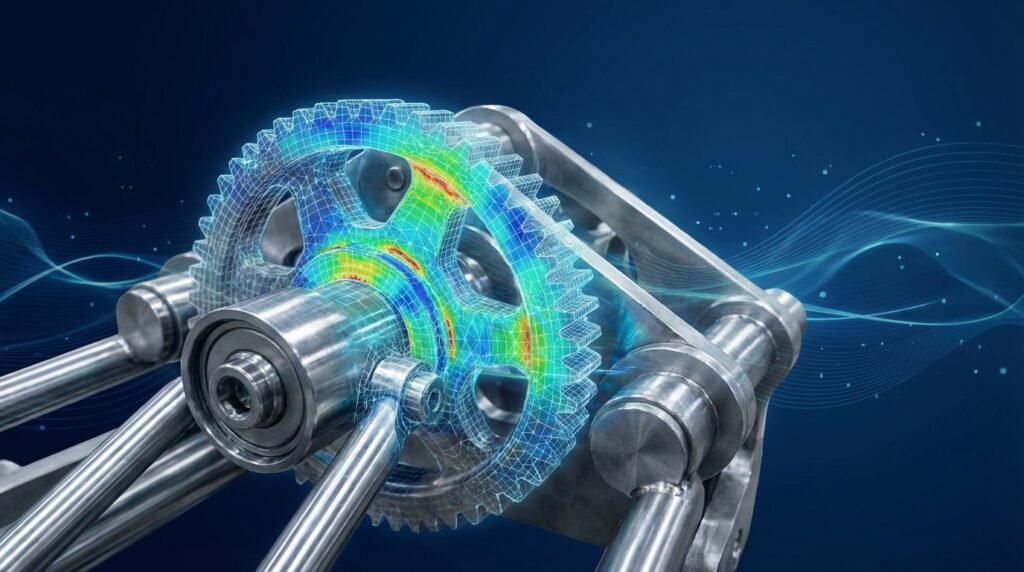
Image: A conceptual representation of Fluid-Structure Interaction, showing fluid flow around a deformable body. Credit: SimScale.
What is FSI Coupling? The Core Concept
At its heart, FSI coupling describes a multi-physics phenomenon where two distinct fields—fluid dynamics and structural mechanics—are intrinsically linked. The interaction can be subtle or dramatic, but its essence is that neither the fluid nor the structure can be analyzed accurately in isolation.
Types of FSI Coupling
The nature of the interaction dictates the complexity of the FSI analysis. We generally categorize FSI into two main types:
- One-Way FSI: In this simpler approach, the fluid flow affects the structure, but the structural deformation does not significantly alter the fluid flow. An example might be calculating the pressure load on a very stiff, large structure due to fluid flow, where the structure’s resulting deformation is negligible and doesn’t change the flow field.
- Two-Way FSI (or Strong Coupling): Here, both fluid and structure influence each other iteratively. The fluid imposes forces on the structure, causing it to deform. This deformation, in turn, changes the fluid domain, altering the flow patterns and thus modifying the forces applied to the structure. This iterative process continues until a converged solution is achieved. Most realistic FSI problems require a two-way coupling approach.
Key Physics Involved
To tackle FSI problems, you’ll be dealing with:
- Computational Fluid Dynamics (CFD): Governed by the Navier-Stokes equations, CFD simulates fluid motion, pressure, velocity, and turbulence. Tools like ANSYS Fluent/CFX or OpenFOAM are commonly used.
- Finite Element Analysis (FEA): Governed by equations of structural mechanics, FEA predicts stress, strain, deformation, and vibration in solids. Software like Abaqus, ANSYS Mechanical, or MSC Nastran are standard.
- Coupling Algorithms: These are the numerical methods that manage the data transfer and iteration between the fluid and structural solvers.
Why FSI Coupling Matters: Engineering Applications
FSI analysis is indispensable across a multitude of engineering disciplines, driving innovation and ensuring reliability.
Aerospace Engineering
- Aeroelasticity: Understanding how aerodynamic forces deform aircraft wings (flutter, divergence) and how that deformation affects lift and drag is crucial for flight safety and performance.
- Turbomachinery: Analyzing blade vibrations due to unsteady fluid flow in compressors and turbines.
Oil & Gas Industry
- Riser & Pipeline Dynamics: Predicting vortex-induced vibrations (VIV) in offshore risers and pipelines due to ocean currents, which can lead to fatigue failure.
- Flow Assurance: Simulating multiphase flow in deformable pipes, especially relevant for highly viscous fluids or wax deposition studies.
Biomechanics and Medical Devices
- Cardiovascular Flow: Simulating blood flow through arteries, heart valves, and stents to understand disease progression (e.g., atherosclerosis) or optimize medical device designs.
- Soft Tissue Mechanics: Analyzing the interaction of surgical tools with deformable biological tissues.
Automotive Engineering
- Tire Hydroplaning: Simulating the interaction between tires and water film on roads.
- Windshield Wiper Dynamics: Analyzing the fluid-structure interaction of wiper blades for effective clearing.
Civil & Structural Engineering
- Wind Engineering: Assessing wind loads and their dynamic effects on tall buildings, bridges, and other flexible structures.
- Dam & Reservoir Interaction: Seismic analysis of dams interacting with impounded water.
The FSI Simulation Workflow: A Step-by-Step Guide
Performing an FSI simulation involves a structured approach, combining expertise in both CFD and FEA.
1. Problem Definition and Scope
Before diving into software, clearly define:
- Objectives: What are you trying to achieve? (e.g., predict peak stress, identify flutter speed, optimize design for reduced vibration).
- System Boundaries: What constitutes your fluid domain and structural domain?
- Interaction Zones: Precisely identify the interface where fluid and structure meet and exchange forces/displacements.
- Assumptions: Steady-state vs. transient, incompressible vs. compressible fluid, linear vs. non-linear materials, turbulence models.
2. Geometry and Meshing
Fluid Domain Meshing (CFD)
- Create or import the fluid volume geometry (e.g., in ANSYS SpaceClaim, DesignModeler, or CATIA).
- Generate a high-quality mesh suitable for CFD (e.g., hex-dominant for efficiency, boundary layers for accurate near-wall flow).
- Ensure mesh quality metrics (skewness, aspect ratio) are within acceptable limits.
Solid Domain Meshing (FEA)
- Create or import the structural geometry.
- Generate a suitable FEA mesh (e.g., hex elements for thicker structures, shell elements for thin walls).
- Refine mesh in areas of high stress gradients or near the FSI interface.
Interface Definition
- Critically, the FSI interface between the fluid and solid domains must be precisely defined and aligned. While meshing for each domain can be independent, the interface element sizes should ideally be compatible to facilitate accurate data transfer.
3. Physics Setup (Fluid & Structural Solvers)
Fluid Solver Setup (e.g., ANSYS Fluent/CFX, OpenFOAM)
- Fluid Properties: Density, viscosity, compressibility.
- Boundary Conditions: Inlets (velocity/pressure profiles), outlets, walls, symmetry conditions.
- Turbulence Model: Select appropriate model (e.g., k-epsilon, SST k-omega) if flow is turbulent.
- FSI Interface: Define the surface that will interact with the solid.
Structural Solver Setup (e.g., Abaqus, ANSYS Mechanical, Nastran)
- Material Properties: Young’s modulus, Poisson’s ratio, density, yield strength (for non-linear analysis).
- Boundary Conditions: Fixed supports, prescribed displacements, initial conditions.
- FSI Interface: Define the surface that will interact with the fluid.
Coupling Strategy
- Partitioned Coupling: Most common approach, where separate CFD and FEA solvers exchange data at the interface. This requires a coupling algorithm (e.g., system coupling in ANSYS, co-simulation in Abaqus) to manage data transfer and convergence.
- Monolithic Coupling: Less common, where a single solver handles both fluid and structure equations simultaneously. More computationally intensive but can be more stable for strongly coupled problems.
4. Solver Settings and Execution
- Time Step: For transient FSI, selecting an appropriate time step is crucial for stability and accuracy. Small time steps increase computational cost but improve stability. Often, the fluid and structural time scales might differ significantly.
- Convergence Criteria: Define criteria for both the individual solvers and the overall FSI loop (e.g., residual reduction for CFD, force/displacement error for FSI iterations).
- Computational Resources: FSI simulations are computationally demanding. Plan for significant CPU/GPU time and memory, often requiring High-Performance Computing (HPC) clusters.
5. Post-Processing and Interpretation
After the simulation, extract and visualize results:
- Fluid Results: Velocity contours, pressure distributions, streamline plots, vortex identification (e.g., with Tecplot, ParaView).
- Structural Results: Stress/strain contours, deformation plots, reaction forces, frequency response (e.g., in Abaqus/Viewer, ANSYS Mechanical post-processor).
- Coupled Behavior: Animate the combined fluid flow and structural deformation to understand dynamic interaction.
Practical Tips for FSI Analysis Success
Navigating FSI simulations can be challenging. Here are some practical tips to improve your chances of success:
- Start Simple: Begin with a 2D or simplified 3D model, or even a one-way FSI analysis, to establish a baseline and gain confidence before tackling full complexity.
- Mesh Compatibility: While not strictly required for all coupling algorithms, having a relatively compatible mesh at the FSI interface (similar element sizes) can improve stability and accuracy of data transfer.
- Time Step Management: For transient FSI, carefully choose your time step. Consider the smallest physical timescale in your problem (e.g., acoustic wave propagation in fluid, structural natural frequencies). Adaptive time stepping can be beneficial.
- Convergence Strategy: Implement under-relaxation factors for the FSI coupling iterations to promote stability, especially for strongly coupled problems.
- Material Models: Use appropriate constitutive models for both fluid and structure. For large deformations, ensure your structural model accounts for geometric non-linearity.
- Monitor Interface Quantities: During the simulation, continuously monitor forces, moments, and displacements at the FSI interface to ensure smooth data transfer and convergence.
- Computational Resources: FSI can be very expensive. Utilize parallel processing (MPI) effectively. For complex scenarios, consider cloud HPC solutions or local clusters.
Common Mistakes in FSI Simulations
Avoid these pitfalls to save time and ensure reliable results:
- Ignoring Initial Conditions: Incorrect initial fluid flow or structural state can lead to convergence difficulties or inaccurate transient behavior.
- Poor Mesh Quality: Low-quality fluid or structural meshes, especially at the interface, can introduce numerical errors and instability.
- Mismatched Time Scales: Using a time step too large for either the fluid or structural physics, leading to instability or inaccurate results.
- Inadequate Coupling Iterations: Not allowing enough inner coupling iterations per time step can lead to poor interface convergence and inaccurate load transfer.
- Incorrect Boundary Conditions: Applying loads or constraints that are physically unrealistic or inconsistent.
- Over-Complication: Trying to model every detail from the outset without understanding the core physics and sensitivities.
Verification & Sanity Checks for FSI Analysis
Ensuring the accuracy and reliability of your FSI results is paramount. Implement these checks throughout your workflow:
1. Mesh Independence Study
Perform separate mesh independence studies for both the fluid and structural domains. Then, check if further refinement of the interface mesh significantly changes the FSI results (e.g., peak stress, displacement). This ensures your results aren’t artifacts of your meshing strategy.
2. Boundary Condition Sensitivity
Slightly vary your critical boundary conditions (e.g., inlet velocity, structural constraints, material properties within their tolerance range) and observe the impact on your results. This helps identify parameters that heavily influence the outcome and assess the robustness of your design.
3. Solver Convergence Monitoring
Beyond monitoring solver residuals, pay close attention to the convergence of interface quantities during the FSI coupling iterations at each time step. Plots of interface forces and displacements over coupling iterations should show a clear leveling off. If they oscillate, it indicates poor coupling convergence, requiring adjustments to relaxation factors or time steps.
4. Validation against Benchmarks or Simplified Models
Whenever possible, compare your FSI results against:
- Analytical Solutions: For highly simplified cases (e.g., flow over a flat plate, beam deflection).
- Experimental Data: If available, physical test data is the gold standard for validation.
- Published Benchmarks: Many FSI benchmark problems exist (e.g., Turek-Hron benchmark for fluid-structure interaction).
- Simplified Simulations: Run a decoupled CFD and FEA analysis, or a one-way FSI, and compare against the full two-way FSI to ensure expected trends.
5. Energy Conservation Checks
For two-way FSI, particularly in transient cases, you can check for energy conservation across the interface. The work done by the fluid on the structure should correspond to the change in structural energy plus dissipation, and vice versa. While complex to implement, this is a powerful diagnostic tool for severe instabilities.
6. Physical Plausibility
Always ask yourself: Do the results make physical sense? Are the deformations realistic? Are the stresses within expected ranges? Is the fluid flow pattern as anticipated? Use your engineering judgment to spot obvious errors before diving into detailed quantitative analysis.
Advanced FSI Topics & Automation
As you become proficient, you might explore:
- Multi-Physics FSI: Incorporating thermal effects (e.g., heat transfer between fluid and structure), electromagnetic fields, or acoustics.
- System-Level FSI: Coupling FSI models with larger system simulations (e.g., ADAMS for multibody dynamics).
- Optimization and Parametric Studies: Leveraging FSI models for design optimization, often requiring many simulation runs. This is where automation shines.
Automation with Python and MATLAB
For repetitive tasks, parametric studies, or design optimization, scripting your FSI workflow with Python or MATLAB is invaluable. You can automate:
- Pre-processing: Generating geometries, meshing, and setting up boundary conditions programmatically.
- Solver Execution: Launching and monitoring CFD and FEA solvers from scripts.
- Post-processing: Extracting key results, generating plots, and creating custom reports automatically.
Many modern CAE tools (Abaqus, ANSYS) offer Python APIs for scripting. OpenFOAM is inherently scriptable. Automating your workflow reduces manual errors and drastically speeds up design exploration.
Looking to streamline your FSI post-processing or set up parametric studies efficiently? Check out our downloadable Python scripts for FSI post-processing and parametric study templates on EngineeringDownloads.com to kickstart your automation journey! We also offer online tutoring and consultancy for advanced FSI challenges.
FSI Coupling Comparison Table
Here’s a quick comparison of one-way and two-way FSI coupling strategies:
| Feature | One-Way FSI Coupling | Two-Way FSI Coupling (Strong Coupling) |
|---|---|---|
| Interaction Direction | Fluid affects structure only. | Fluid affects structure, and structure affects fluid. |
| Computational Cost | Lower (two separate simulations). | Higher (iterative, coupled simulations). |
| Accuracy | Suitable when structural deformation has negligible impact on flow. | Required when structural deformation significantly alters flow. |
| Applications | Pressure on a very rigid pipe, wind load on a massive building. | Wing flutter, blood flow in arteries, vortex-induced vibration. |
| Complexity | Simpler to set up and converge. | More complex, requires robust coupling algorithms and convergence strategies. |
Further Reading
For more in-depth technical details on the numerical methods and theoretical background of FSI, refer to the OpenFOAM User Guide on Fluid-Structure Interaction.