

Introduction
In modern engineering workflows, simulation tools are indispensable. They enable engineers to virtually test designs under various conditions, reducing the need for costly physical prototypes and accelerating innovation. Two of the leading finite element analysis (FEA) platforms are Abaqus and ANSYS, each with decades of development behind them. In 2025, these tools remain at the forefront of engineering simulation, powering everything from automotive crash tests to aerospace component optimization. This article provides an in-depth comparison of Abaqus vs ANSYS in 2025 – examining their history, capabilities, user experience, and use cases – to help you determine which software might be the better fit for your needs. (For a primer on FEA itself, see our guide “What Is Finite Element Analysis?” for background.) Both Abaqus and ANSYS consistently rank among the Top FEA Software in 2025 used by industry and academia, but they have distinct strengths and specialties. Read on for a detailed breakdown and practical advice on choosing between them.

History and Ownership
Abaqus and ANSYS were born in the early era of commercial FEA and have evolved under different corporate umbrellas. Abaqus was first released in 1978 by Hibbitt, Karlsson & Sorensen (HKS) as a general-purpose nonlinear FEA code. It gained a strong reputation for advanced material modeling and explicit dynamics. In 2005, Abaqus (then ABAQUS, Inc.) was acquired by Dassault Systèmes for $413 million, becoming part of the SIMULIA brand. Under Dassault, Abaqus has been integrated into the 3DEXPERIENCE platform alongside tools like CATIA for CAD. Today, Abaqus is maintained by Dassault Systèmes and is updated annually (Abaqus 2025 was released in late 2024, following the yearly update cadence).
ANSYS, on the other hand, was founded even earlier – in 1970 – by Dr. John Swanson as Swanson Analysis Systems, Inc. The company introduced ANSYS as a general FEA program and steadily expanded its scope. ANSYS, Inc. went public in 1996 and grew by acquiring numerous simulation technologies (for fluids, electromagnetics, etc.) over the years. A major development in 2025 is that ANSYS, Inc. was acquired by Synopsys (a leader in electronic design automation) in a deal completed on July 17, 2025. This acquisition positions ANSYS under a larger corporate umbrella, potentially fostering closer integration between mechanical simulation and electronics design. Despite this change in ownership, the ANSYS product suite (often stylized as Ansys in recent branding) continues its regular release cycle (e.g., Ansys 2025 R1 and R2) with a focus on broad multiphysics capabilities. In short, Abaqus is now owned by Dassault Systèmes (as part of SIMULIA), whereas ANSYS (Ansys, Inc.) is now a subsidiary of Synopsys. Both companies leverage their parent ecosystems: Abaqus ties into Dassault’s CAD/PLM tools, while Ansys benefits from Synopsys’s strengths in electronics.
User Interface and Experience (UI/UX)
One of the more noticeable differences between Abaqus and ANSYS is in their user interfaces and overall user experience. ANSYS offers a modern, GUI-driven environment called Ansys Workbench. Workbench provides a project schematic where you can drag-and-drop analysis blocks (for geometry, mesh, solution, post-processing, etc.) and easily link different physics solvers. This interface is often praised for being intuitive and relatively easy to learn for beginners. In user surveys, ANSYS scores slightly higher on ease-of-use; for example, G2 crowd ratings show users find Ansys’s command workflow clarity a bit smoother than Abaqus’s. The Workbench GUI also integrates various simulation types (FEA, CFD, electromagnetics) under one roof, which can reduce confusion when setting up multiphysics studies. ANSYS’s 3D modeling and meshing tools are well-regarded and include automated meshing and adaptive mesh refinement, which help new users get reliable results with less manual effort. Overall, ANSYS’s interface is flexible and polished, offering menu-driven customization and plenty of learning resources for newcomers.
Abaqus, in contrast, uses the Abaqus/CAE (Complete Abaqus Environment) interface for pre- and post-processing. Abaqus/CAE is a robust tool, but its design is a bit more spartan and “standardized” in layout. The GUI is organized into modules (e.g., Part, Property, Assembly, Step, Mesh, Job, Visualization), each corresponding to a stage of the simulation workflow. Many users note that Abaqus/CAE feels less cluttered – at first glance, it can actually appear simpler with a clear module menu and model tree. In fact, one comparison noted “at first look, Abaqus has a simpler interface and is less confusing than ANSYS”, because Abaqus’s GUI presents only the relevant options for the current module. This consistency can benefit experienced users who become fluent in the Abaqus process. However, Abaqus’s UI may have a steeper learning curve for those not already familiar with FEA. It lacks some of the guided wizards and automatic settings that ANSYS Workbench provides. For example, ANSYS includes many engineering templates and an extensive material library out-of-the-box, whereas Abaqus often requires the user to define materials and units carefully from scratch. New Abaqus users sometimes stumble over unit consistency (since Abaqus doesn’t enforce a unit system – you must be self-consistent), while ANSYS’s interface and documentation more explicitly handle units and have default material data that can be imported.
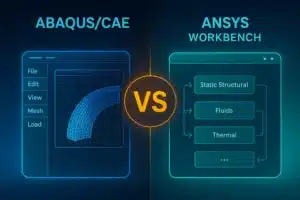
To illustrate the UI differences, the image below shows the main interfaces of Abaqus/CAE (left) and Ansys Workbench (right). Abaqus presents a module-based menu at the top and a model tree on the left, guiding the user through model setup sequentially. ANSYS Workbench, on the other hand, uses a flowchart-like project view where different analysis systems and physics can be connected. Each approach has its merits: Abaqus’s UI is very consistent and focused on FEA tasks, while ANSYS’s UI is more flexible and integrates multiple simulation domains in one workspace. According to user feedback, ANSYS’s interface tends to be more immediately approachable for beginners, whereas Abaqus’s interface, once learned, is highly efficient for experts.
FEA software UIs: A side-by-side look at Abaqus/CAE (left) vs. ANSYS Workbench (right). Abaqus uses a modular, step-by-step interface for model building, which can be very powerful but requires familiarity. ANSYS’s Workbench interface provides a canvas to manage the entire simulation workflow graphically, often considered more intuitive for new users. In surveys, users often cite ANSYS’s ease of use and integration as advantages, while Abaqus is praised for its no-nonsense, engineering-focused layout once the learning curve is overcome. Both UIs support scripting and automation (as discussed later), allowing power users to customize the environment.
FEA Capabilities and Solvers
When it comes to pure FEA capabilities, both Abaqus and ANSYS are powerhouse tools – capable of linear and nonlinear structural analysis, dynamics, heat transfer, and more. Each offers a vast element library and supports a range of analysis types. The choice often comes down to the specific types of simulations you need to perform, as each software has areas where it particularly excels.
Abaqus is historically renowned for its strength in nonlinear finite element analysis. It was designed from the outset to handle complex material behaviors and contact problems. The Abaqus suite includes two primary solver modules: Abaqus/Standard (implicit solver for static, modal, and low-speed dynamic problems) and Abaqus/Explicit (explicit solver for high-speed dynamics, impacts, and highly nonlinear events). This dual-solver approach allows Abaqus to tackle everything from a simple linear static stress analysis to a simulation of a car crash or metal forming operation. Abaqus/Explicit, in particular, is a go-to for many engineers doing crash safety and impact simulations, as it can handle severe element distortions and contact without the convergence issues that implicit solvers sometimes face. Abaqus was “initially designed to address non-linear physical behavior,” which is reflected in its extensive material models (metals, hyperelastic rubbers, plastics, foams, composites, soils, etc.) and robust contact algorithms. Many users report that Abaqus has very strong convergence behavior for tough contact problems and nonlinear materials – “if you intend to do any non-linear analysis, Abaqus is certainly better… [with] better convergence and contact handling”. In 2025, Abaqus continues to improve its solvers; the latest release introduced new material models and contact enhancements to further extend its nonlinear and multiphysics capabilities.
ANSYS, by comparison, is often seen as a more all-around simulation platform. The core Ansys Mechanical solver is excellent for a wide range of structural analyses, from linear static and modal analyses up through nonlinear and explicit dynamics. ANSYS has its own explicit solver (Ansys Autodyn and Ansys LS-DYNA are options for highly nonlinear events), though these are sometimes separate modules. For typical FEA tasks like linear stress analysis, vibration/modal analysis, and thermal stress, ANSYS Mechanical is extremely robust and widely validated. One user-generated summary noted “Ansys excels in finite element analysis with robust capabilities for complex simulations”, giving it a slight edge in user satisfaction scores for general FEA functionality. ANSYS also tends to integrate tightly with optimization and design exploration tools (e.g., topology optimization, parameter studies) available in Workbench. Its automated contact detection and convergence aids make setting up moderately nonlinear problems relatively straightforward. However, some experts might argue that for the most challenging nonlinear problems (think intricate contact between deformable bodies, or exotic material models), Abaqus’s specialized heritage gives it an edge in those niche cases. Another perspective from experienced users: “Once I started doing nonlinear material analyses in ANSYS, I had a lot of convergence problems… Abaqus handled these better”. In general, for routine FEA (linear or mildly nonlinear) both tools perform excellently; for extreme nonlinearity, Abaqus has a long track record of success, while ANSYS can do it too but might require more careful tuning or the use of add-on solvers.
Another aspect of capabilities is solver performance and scalability. In 2025, both Abaqus and ANSYS support parallel computing (SMP and distributed memory) to run simulations on multiple cores or HPC clusters. ANSYS has been investing heavily in performance upgrades – for instance, Ansys Mechanical 2025R1 introduced a GPU-accelerated direct solver that is “up to 6× faster” for certain large simulations. ANSYS supports GPU computing for both its structural and fluid solvers, and the 2025 releases highlight improved HPC scaling and even cloud-based solver options. Abaqus also supports parallel execution (you can deploy Abaqus jobs across many CPU cores and it supports some GPU acceleration for linear algebra operations and user subroutines). Recent Abaqus updates have focused on solver efficiency as well – the 2025 version includes “performance enhancements for structural/acoustic simulation” and scalable eigensolvers for large models. In practice, the performance difference will depend on the specific problem and hardware. Both solvers are used on supercomputers for massive simulations. If your concern is solving very large models quickly, you’ll want to investigate benchmarks for your model type in both tools. ANSYS may have an edge with easier out-of-the-box GPU utilization in 2025 (and Ansys offers an HPC licensing pack for scaling to dozens of cores), whereas Abaqus is often lauded for efficient scaling on CPU clusters. Either way, both companies are leveraging the latest computing technologies: e.g., ANSYS 2025 includes AI assistants and streamlined data handling to help engineers set up and interpret simulations faster, while Abaqus 2025 is refining core solver algorithms for speed and fidelity.

Multiphysics and CFD Support
Where Abaqus and ANSYS diverge more clearly is in their multiphysics breadth – especially computational fluid dynamics (CFD) and related physics. ANSYS is well-known as a multiphysics platform: the company offers dedicated solvers for fluids (Ansys Fluent and CFX for CFD), electromagnetics (Ansys HFSS, Maxwell), electronics, optics, and more. Through the Ansys Workbench environment, you can set up coupled simulations (for example, fluid–structure interaction or thermal–electric–structural analysis) relatively seamlessly. ANSYS Mechanical itself handles structural, thermal, and some acoustic analyses, and it can be coupled to Fluent for two-way fluid–structure interaction or to Ansys EM solvers for magnetic force calculations on structures. In 2025, ANSYS enhanced these integrations further, with streamlined workflows in Workbench and even cloud-based coupling. Users highlight that “Ansys Mechanical’s integration capabilities score 9.0, making it easier to connect with other software tools”. For instance, you might import pressure fields from a CFD simulation directly into a structural simulation within Workbench. Moreover, ANSYS’s 2025 R2 release introduced Ansys Engineering Copilot, an AI-driven assistant that works across tools like Mechanical and Fluent to help set up simulations and catch issues – reflecting the breadth of the ecosystem. In short, if your work involves true multiphysics (especially fluids or electromagnetics coupled with structures), ANSYS provides a one-stop shop where all physics live under one platform.
Abaqus, being part of SIMULIA, also supports multiphysics to a degree, but its scope is somewhat more specialized. The core Abaqus solver can do coupled structural-pore pressure analysis (for geotechnical simulations), thermo-mechanical coupling, structural-acoustic coupling, and piezoelectric analysis within a single model[41]. In fact, Abaqus is used for simulations like tire rolling (which involves structural deformation and contact, coupled with heat generation) or shock absorption with fluid-filled components (via its acoustic and pore fluid elements). However, Abaqus is not a general-purpose CFD tool. There was an Abaqus/CFD module in the past, but it was discontinued after Abaqus 2017[42]. Instead, Dassault Systèmes offers other products for fluids (such as XFlow or PowerFLOW in the SIMULIA portfolio). Co-simulation is possible – for example, coupling Abaqus with the STAR-CCM+ CFD code (from Siemens) or with other specialized tools using the SIMULIA Co-Simulation Engine – but these are more bespoke solutions. Practically speaking, if you need to simulate fluid flow or aerodynamics as well as structural response, Abaqus alone won’t cover the CFD; you would need a separate CFD solver and then possibly couple it to Abaqus. ANSYS, on the other hand, includes industry-leading CFD solvers (Fluent) as part of its suite. So for fluid dynamics or general-purpose multiphysics, ANSYS has a clear advantage in convenience. That said, Abaqus excels in certain coupled scenarios that are more structural in nature – for example, fluid-structure interaction where the fluid is relatively simple (maybe treated as an acoustic medium or using smoothed-particle hydrodynamics for fluids in Abaqus Explicit), or multiphysics within structures (like thermal stress or piezoelectric effects). Abaqus’s recent updates even mention “improvements in contact for multiphysics”, hinting at better algorithms for coupling different domains (perhaps structural–thermal contact or similar).
In summary, ANSYS offers a broader built-in multiphysics suite, including full CFD and electromagnetic analysis, all integrated in Workbench. Abaqus is more narrowly focused on mechanical and structural simulations, with some multiphysics capabilities in that realm, but relies on the wider Dassault portfolio or external tools for fluid flow problems. If your project is primarily structural/mechanical, both tools are great – but if you foresee heavy CFD or electromagnetic analysis alongside FEA, ANSYS will likely streamline your workflow significantly.
Materials Modeling and Customization
Materials modeling is a critical aspect of FEA, especially as industries push into new composites, plastics, and meta-materials. Here, Abaqus has long been lauded for its comprehensive material modeling options. It comes with an extensive library of built-in material models: from classical linear elasticity and metal plasticity to hyperelastic rubbers (Neo-Hookean, Ogden, etc.), crushable foams, concrete damage models, shape memory alloys, and more. Abaqus’s roots in nonlinear analysis mean it can capture complex phenomena like progressive damage and failure (with cohesive zone models), viscoelastic and viscoplastic behavior, and user-defined equation-of-state for materials. A notable strength is Abaqus’s support for user subroutines like UMAT and VUMAT, which allow advanced users to code their own material constitutive models in Fortran or C++ and plug them into the solver. This is one reason Abaqus is popular in research environments – if a researcher invents a new material model, Abaqus provides a framework to implement and test it. Indeed, many research papers reference using Abaqus to simulate novel materials due to this flexibility, and users can define entirely new material behaviors if the built-in ones don’t suffice. The 2025 version of Abaqus introduced new material models as well, indicating continuous development to support emerging engineering materials.
ANSYS also offers a wide array of material models, covering most engineering needs: metal plasticity (including advanced kinematic hardening laws), creep, hyperelasticity (ANSYS has models for rubber too), viscoelasticity, composite failure criteria, etc. For most standard materials, ANSYS will perform just as well as Abaqus. ANSYS Mechanical includes a material library that comes with a database of common materials and their properties, which is convenient (whereas Abaqus typically expects the user to input material properties from scratch or via scripts). ANSYS also allows user-defined materials via UserMat functions or APDL routines, though this has historically been a bit less straightforward than Abaqus’s UMAT interface. One area where anecdotal feedback suggests Abaqus might have an edge is extremely complex or novel material behavior. For instance, some specialists note that Abaqus handled certain shape memory alloy or elastomer models more readily than ANSYS’s built-in offerings. That said, ANSYS is continually improving – its recent versions have focused on materials for additive manufacturing (including scan pattern simulation for metal 3D printing), and ANSYS also provides tools like Granta MI for materials data management.
Both Abaqus and ANSYS support failure and fracture modeling (crack propagation, etc.), though via different methods. Abaqus has cohesive elements and an XFEM (extended finite element method) capability for crack growth, which some consider very powerful for fracture simulations. A comparison noted “ABAQUS is better in fracture and cracks analysis by the XFEM method, and ANSYS cannot help much [there]” – a claim reflecting that Abaqus introduced robust XFEM earlier. ANSYS also has an XFEM-based crack growth tool, but it might not be as widely used.
In summary, for materials: Abaqus’s material modeling is a strong point, especially for exotic materials and user customization. ANSYS has a broad and mature set of material models too, and for typical metals, plastics, composites both tools are well-equipped. If your simulations involve cutting-edge material research or require custom constitutive laws, Abaqus might give you more flexibility out-of-the-box. On the other hand, if you prefer having a ready library of standard materials to pick from (and perhaps less coding), ANSYS’s approach might be friendlier.
Scripting and Automation
Both Abaqus and ANSYS provide ways to automate workflows and customize the software via scripting – an essential feature for power users doing repetitive studies or integrating FEA into optimization loops.
Abaqus uses Python as its primary scripting language. In fact, Abaqus/CAE is essentially built on a Python API; any action you perform in the GUI can be recorded as a Python script. Users can write Python scripts to create or modify models, submit jobs, and extract results. The Abaqus Python API (sometimes called Abaqus Scripting Interface) is well-documented, allowing creation of geometry, assignment of loads, running parametric studies, etc., all via code. This makes it possible to build custom preprocessors or link Abaqus with other software (for example, to run an optimization where Abaqus is called repeatedly by an external program). Moreover, Abaqus supports GUI customization through the FOX toolkit – advanced users can even create custom dialog boxes or menu items in Abaqus/CAE by writing Python/Qt code. On top of that, as mentioned, user subroutines in Fortran/C provide low-level customization (not only for materials, but also for elements, loads, output requests, etc.). The flexibility to script and extend Abaqus is a major reason it’s beloved in research and by companies with very specific simulation needs.
ANSYS historically used a proprietary scripting language called APDL (ANSYS Parametric Design Language). APDL is a text-based command language that underpins the Mechanical solver. Experienced ANSYS users often write APDL macros to automate model generation or to access advanced solver features not exposed in the GUI. While APDL is powerful, it has a steeper learning curve (it’s somewhat akin to an older programming language syntax) and is specific to ANSYS. In recent years, recognizing the popularity of Python, Ansys has introduced more Python support. There is an ANSYS Python API (for example, PyAnsys libraries) that allows scripting Workbench and Mechanical using Python. In 2025, this trend intensified – Ansys 2025 R2 touts “expanded Python compatibility and an open engineering framework” to make automation easier across its tools. Ansys’s ACT (Application Customization Toolkit) also allows users to create custom dialogs and extensions for Mechanical using IronPython (a .NET implementation of Python). This means you can essentially script Ansys Mechanical in Python to add new buttons or connect it with external processes. While previously Abaqus might have been seen as more “programmer-friendly” due to its Python standardization, ANSYS is now virtually on par, offering Python as well for those who prefer it.
From a practical standpoint, if you plan to automate a lot: Abaqus’s Python scripting is very straightforward – e.g., you can generate input files or run parameter sweeps by writing Python scripts that drive Abaqus/CAE or Abaqus solvers. ANSYS offers both APDL and Python – you might use APDL for low-level control within Mechanical, or use the newer PyAnsys tools to script things at a higher level. Some users comment that “ABAQUS has a simpler coding platform compared to ANSYS”, largely because using Python directly feels more modern than APDL. They also point out that Abaqus’s support for user subroutines (UMAT, etc.) is a big plus for flexibility. However, ANSYS is catching up; by 2025, you can do most automation in ANSYS via Python as well, and Ansys’s documentation and examples for scripting are expanding. If coding is your forte and you want deep customization, you’ll likely be comfortable with either tool – perhaps leaning Abaqus if you enjoy Python and low-level tweaking, or ANSYS if you want to script across multiple physics (since Ansys’s APIs can also reach into Fluent, etc.).
In summary, both tools support extensive scripting: Abaqus through Python (and Fortran/C++ subroutines) natively, and ANSYS through APDL and increasingly Python APIs. Abaqus may still have a slight edge in straightforwardness of its scripting interface, but ANSYS’s multi-tool automation capabilities are very strong, especially for linking different analysis types.
Industry Adoption and Community Support
The user community and industry adoption patterns for Abaqus vs ANSYS are somewhat distinct, although both are highly respected in the engineering world.
ANSYS (Ansys Mechanical and its related products) has a very large global user base. It is commonly taught in universities and used across a wide range of industries – aerospace, automotive, electronics, energy, industrial equipment, healthcare, you name it. Many companies have standardized on ANSYS as their go-to CAE suite, owing to its broad capabilities. The result is a vast community: countless online forums, tutorial videos, and training courses are available for ANSYS users. Indeed, ANSYS has “a larger user community, with more resources available online”. The company provides a free student version of Ansys, which further expands its reach among engineering students. In industry surveys, ANSYS is often cited as one of the most widely used simulation tools. This widespread adoption means if you run into a problem, there’s a good chance someone on a forum (like the Ansys Learning Forum or XANSYS mailing list) has encountered it. ANSYS Inc. also offers formal customer support and an extensive knowledgebase. As of 2025, with Synopsys as the parent, ANSYS’s integration into electronics and semiconductor industries may grow, but its core base in mechanical/aerospace remains strong. Users also appreciate that ANSYS often has frequent webinars, tutorials, and an online learning center – more so than some competitors – making self-learning easier.
Abaqus has a slightly different footprint. It is highly prevalent in certain industries and high-end applications. In automotive and aerospace companies, Abaqus is frequently used alongside or in place of ANSYS for specific tasks – for instance, virtually every major car manufacturer has Abaqus in their crash simulation or tire modeling toolkit, and many aerospace firms use Abaqus for composite material analysis and nonlinear structural problems. According to Wikipedia, “Abaqus is used in the automotive, aerospace, and industrial products industries” and is popular in research institutions for its advanced modeling capabilities. The community around Abaqus, while smaller, is very focused and expert. SIMULIA (Dassault) hosts user conferences and has a robust support team; many users report that “Abaqus user support is an order of magnitude better” than some others – perhaps due to the dedicated attention given to complex problems. There are online forums such as the Simulia Learning Community and Eng-Tips Abaqus forum where discussions can be quite advanced. In academia, Abaqus is widely used for research and many scholarly papers include simulations done in Abaqus, which means a rich literature exists. However, it’s true that Abaqus’s community is smaller and less beginner-oriented than ANSYS’s. One observer noted “ANSYS has more free resources and a wider range of users, whereas Abaqus’s user community is smaller but very specialized”. Abaqus is sometimes perceived as being used more by PhD-level analysts and experts – this is a generalization, but it speaks to its niche in tackling hard problems.
Interestingly, opinions vary on industry vs academia split. Some have said “Ansys is more used in industries and Abaqus is more used in academics”, while others claim “Abaqus is more applicable and fast for industries, while Ansys is better for academic applications”. These contradictory viewpoints likely stem from personal experiences. In truth, both tools are used in both industry and academia. It might boil down to what your peers or partners are using: if your industry sector predominantly uses ANSYS, you may find more talent and resources around ANSYS, and vice versa for Abaqus in sectors like high-end automotive or defense.
From a business perspective, consider also integration with other software: Abaqus (SIMULIA) integrates well with other Dassault products (CATIA for CAD, fe-safe for fatigue, Isight for optimization, etc.), so companies heavily invested in the Dassault ecosystem (CAD/PLM) may lean towards Abaqus for a streamlined workflow. ANSYS, being more CAD-neutral, provides plug-ins for various CAD programs and has strong links to tools like SpaceClaim for geometry. ANSYS’s broad industry adoption also means many third-party tools and add-ons support ANSYS formats.
Lastly, training and skill availability: If you’re looking to hire simulation engineers, you might find more entry-level engineers familiar with ANSYS (thanks to its presence in many university curriculums). Abaqus skills are also out there, but often among those with specialized simulation backgrounds. Both Dassault and Ansys offer certification programs and training courses.
In summary, ANSYS has the edge in sheer number of users and breadth of community support, making it a safe bet if community help and widespread adoption are priorities. Abaqus has a very strong following in specific circles and is highly regarded by expert analysts, with a supportive (if smaller) community and excellent vendor support for tough technical issues. Neither tool will leave you stranded for support in 2025 – it’s more about whether you prefer being one of a huge crowd (ANSYS) or part of a tighter-knit specialist group (Abaqus).
Key Use Cases and Strengths of Each Tool
Both Abaqus and ANSYS are general-purpose FEA solvers, but each shines especially in certain applications:
- Abaqus Excels In:
- Highly Nonlinear Structural Simulations: Abaqus is often the first choice for simulations involving complex contact (e.g., seal assemblies with large deformations, gear tooth contact with backlash, etc.) and material nonlinearity (plastic collapse, hyperelastic behavior of rubber components, etc.). Its solvers are very robust for these scenarios.
- Dynamic Impact and Crash Analysis: Abaqus/Explicit is widely used for crashworthiness simulations in automotive and defense. For example, crash test simulations of vehicles, drop tests of electronic devices, and ballistic impact on armor are frequently done in Abaqus or its cousin LS-DYNA. Abaqus handles the severe element deformations and energy absorption calculations reliably, which is why many crash analysts are Abaqus experts.
- Composite Materials and Delamination: Abaqus has advanced capabilities for composite layup modeling and progressive damage. It can simulate delamination in composite laminates using cohesive elements or VCCT (virtual crack closure technique). Aerospace companies use Abaqus to analyze composite wings, fuselages, and wind turbine blades under load.
- Geomechanics and Civil Engineering: With features like the porous media model (soil consolidation) and rock material laws, Abaqus sees use in geotechnical engineering (e.g., tunnel excavation simulations, dam and embankment analysis). Its ability to couple pore pressure with stress makes it suitable for soil-structure interaction under seismic loads, for instance.
- Biomechanics and Hyperelasticity: In the biomedical field, Abaqus is popular for simulating soft tissues, medical devices, and biomechanical systems. Its hyperelastic material models and custom subroutine capability let researchers simulate things like artery inflation, prosthetic device behavior, or even film stretching in manufacturing processes.
- Customization-Heavy or Research Environments: If a project involves developing new simulation techniques (new element formulations, one-off analysis procedures, etc.), Abaqus is often chosen because users can script and program their own solutions. For example, academic research on novel finite elements or multiphysics coupling might employ Abaqus as the framework.
- ANSYS Excels In:
- Multiphysics Product Design: ANSYS is unparalleled when you need to analyze a product under multiple physics. For example, designing an electronics enclosure might involve thermal analysis (component heating and airflow using Fluent), then structural analysis of thermal stresses in Mechanical, and perhaps an electromagnetic interference analysis – all of which can be done under the Ansys umbrella. This makes ANSYS a go-to in industries like consumer electronics, where a single workflow might encompass CFD, electromagnetic, and structural simulations.
- Thermal-Structural and Thermal Management: ANSYS Mechanical is very strong in conjugate heat transfer and thermal stress analysis for engines, turbines, batteries, and so on. You can take results from an ANSYS Fluent CFD analysis of cooling flow and map them as loads in ANSYS Mechanical with relative ease. Companies working on engines, power plants, or battery packs value this seamless coupling.
- Vibration and Frequency Domain Analysis: ANSYS has long been used for modal analysis, harmonic response, and random vibration (especially in automotive NVH – noise, vibration, harshness – analysis). Its modal superposition methods and frequency response solvers are efficient and well-validated. For example, if you’re analyzing the vibration of a spacecraft component or doing a seismic analysis of a structure, ANSYS provides robust solvers and tools like spectrum analysis, mode combinations, etc. (Abaqus can do these too, but ANSYS is equally strong and often more commonly used in these contexts).
- Optimization and Design Exploration: ANSYS Workbench includes tools for parametric optimization, such as DesignXplorer, and it integrates with optimization packages to do topology optimization or design of experiments. If you want to perform shape optimization on a bracket (iterating geometry to reduce weight) or run a parametric sweep of a dozen variables, ANSYS provides a convenient framework. Abaqus can do optimization as well (with its Tosca module for topology optimization, for instance), but ANSYS’s integration of such studies in Workbench is very user-friendly.
- General Industrial Use and Team Collaboration: For companies that need a wide range of analyses on a day-to-day basis (from a simple bracket stress test to a flow analysis of a valve to an electromagnetic simulation of a motor), ANSYS’s suite allows all engineers to work in a unified environment. The learning curve for each new analysis type is not steep since Workbench ties them together with a common look and feel. ANSYS is often the default choice in such “generalist” engineering teams due to this versatility. Additionally, Ansys’s licensing allows packing many capabilities which large teams can share, which is attractive to enterprise users.
Of course, there is overlap in these use cases – both Abaqus and ANSYS are very capable for most structural analyses. You will absolutely find instances of each being used in all the scenarios above. Often, the preference comes from legacy or validation: if a company has used Abaqus for 10 years for a certain simulation, they trust its results and continue with it; similarly, if an engineer grew up using ANSYS, they might stick with what they know.
Practical example: A motorsport company might use Abaqus to simulate the rubber tires (hyperelastic, large deformation) and crash safety of their racecar, because those problems are highly nonlinear and Abaqus gives them confidence in capturing the physics. The same company might use ANSYS to analyze their engine’s coolant flow (CFD in Fluent) and the thermal stresses in the engine block (Mechanical), as well as the electromagnetic performance of sensors (HFSS). It’s not uncommon for large organizations to have both tools and use each for what it’s best at. If you only can invest in one, you need to consider what types of projects dominate your workload.
Simulation examples: Finite element simulation can range from simple to incredibly complex. The image above shows an FEA result of a three-car crash scenario, a highly nonlinear dynamic simulation that tools like Abaqus or ANSYS (LS-DYNA) can perform to predict vehicle deformation and passenger safety. On the other end, simpler structural analyses – like the stress distribution in a concrete plate (image below) – are everyday tasks that both Abaqus and ANSYS handle with ease. Abaqus’s heritage gives it an edge in the crash simulation realm, handling complex contact and material failure, whereas ANSYS’s broad capabilities make it versatile for both the crash and subsequent analyses like thermal effects or vibrations on components. Ultimately, the right tool can depend on the specific use case – each software has proven its worth in particular niches of simulation.
A sample FEA simulation result: Stress contour plot of a concrete plate under load (from a structural FEA analysis). Such linear or mildly nonlinear simulations can be handled by both Abaqus and ANSYS with high accuracy. In choosing between them, consider where you might push into extremes: e.g., Will you need advanced material models or custom subroutines (favoring Abaqus) or multi-physics and quick turnaround (favoring ANSYS)? Both tools are trusted for critical engineering simulations – from civil engineering structures to cutting-edge product designs – and each has domains where it particularly shines.
Choosing Between Abaqus and ANSYS
So, which simulation software is better in 2025 – Abaqus or ANSYS? The honest answer is that it depends on your specific needs, and “better” will differ from one organization to another. Here are some practical considerations to guide your choice:
- Analysis Requirements: Make a list of the types of simulations you will perform most often. If your work is heavily focused on nonlinear structural mechanics, complex contact, or requires frequent customization of material models, Abaqus might give you an edge with its robust nonlinear solver and user subroutine capabilities. If your work spans multiple physics (fluids, thermal, electrical, etc.) or involves mostly linear analysis with occasional nonlinearity, ANSYS offers a more integrated multiphysics environment and user-friendly setup for a variety of scenarios. Each tool can do a bit of everything, but consider the “center of gravity” of your simulation needs.
- User Skill and Learning Curve: For teams with less FEA experience or a desire to get new engineers up to speed quickly, ANSYS’s easier learning curve and extensive learning resources are a big plus. The interface guides users through common tasks, and the large community means tutorials for basic and intermediate simulations are easy to find. Abaqus, while not impossible to learn, often rewards expertise – it may take a bit more training to become fully proficient, but an expert user can leverage Abaqus’s power immensely. If you already have an in-house FEA guru or your team is willing to invest in training, Abaqus can be extremely rewarding. If not, ANSYS might yield productivity faster. (Related reading: see “How to Choose the Right Simulation Software for Your Industry” for a broader discussion on aligning software choice with team expertise and industry context.)
- Software Ecosystem and Integration: Think about your current toolchain. Are you a CATIA or SOLIDWORKS shop using Dassault’s 3DEXPERIENCE platform? If so, Abaqus will fit neatly into your PLM ecosystem (e.g., there is “Abaqus for CATIA” integration). Conversely, if you use a variety of CAD tools or already use other Ansys products (Fluent for CFD, etc.), then ANSYS will likely provide a smoother integration and data transfer. Also consider results processing and sharing: ANSYS has the advantage of tools like Ansys Viewer for sharing simulation results in a lightweight way, and their upcoming cloud features might align with companies looking for web-based access. Dassault also has 3DEXPERIENCE cloud for simulation, but that’s a broader PLM approach. Align the simulation software with your IT infrastructure and other engineering tools for maximum efficiency.
- Licensing and Cost: While exact pricing is beyond our scope, traditionally Abaqus licenses have been quite expensive, often token-based, and geared towards high-end usage (some smaller companies find it pricey for occasional use). ANSYS licenses can also be expensive, but Ansys offers more granular packages (e.g., an Ansys Mechanical Enterprise vs Professional, etc., and add-ons for HPC). If budget is a major factor and you only need certain capabilities, pricing differences might influence you. Both vendors offer leasing and token-based systems now. It’s wise to get quotes and see which fits your budget for the features you need. Sometimes, a deciding factor can be how the software scales cost-wise with additional users or HPC usage. Consider too the availability of a free student version or research licenses if that applies.
- Support and Vendor Relationship: If you anticipate needing a lot of support, consider the vendor presence. Abaqus (SIMULIA) typically works with customers closely on advanced applications – if you value that relationship and maybe even collaboration on methodology, that could sway you toward Abaqus. Ansys, being larger in user base, has more formal support channels and a big network of value-added resellers (VARs) who provide training and support. Depending on your location and industry, one or the other might have a stronger support network locally.
- Longevity and Updates: Both tools are continuously updated. ANSYS has two major releases each year (R1, R2) with new features, and their roadmap is increasingly about integration (with Synopsys now, possibly more electronic design tie-ins) and leveraging AI for simulation setup. Abaqus (SIMULIA) releases a new version yearly and periodic feature pack updates. Abaqus’s development focus seems to be on deeper physics (contacts, materials, etc.) and integrating into Dassault’s model-based systems engineering approach. If you’re interested in the bleeding-edge features like AI assistants in simulation (Ansys) or unified CAD+FEA platform (Dassault), that might factor in.
- External Collaboration: If you often exchange simulation models or results with partners, consider what format they use. An automotive OEM might require suppliers to submit Abaqus results for nonlinear analyses, or conversely, an aerospace contractor might standardize on ANSYS for reports. Using the same tool as key partners can ease collaboration. Both Abaqus and ANSYS can import/export common formats (like Nastran bulk data, etc.), but working in the same tool avoids translation issues.
In many cases, there isn’t a wrong choice – both Abaqus and ANSYS are world-class simulation packages used by top engineers. It may even come down to personal or team preference. One tongue-in-cheek summary by a simulation expert went: ANSYS is like a Swiss army knife – versatile and user-friendly, whereas Abaqus is like a specialized power tool – when you need it, nothing else will do. Your specific projects will determine if you need the specialized power or the broad versatility.
Conclusion
Abaqus vs ANSYS in 2025 is not a one-size-fits-all verdict. They are like two seasoned athletes in the simulation arena, each with gold medals in different events. Abaqus, under Dassault’s wing, continues to dominate in extreme nonlinear simulations and offers unparalleled customization for those who push the limits of FEA. ANSYS, now part of Synopsys, remains the industry’s multiphysics workhorse, constantly innovating in UI, integration, and solver breadth to cater to a wide audience. The “better” software is the one that best aligns with your engineering challenges: Abaqus might be better for a research lab simulating new materials or an automotive team doing intricate crash analysis, while ANSYS might be better for a design firm that needs to analyze fluid flow, electromagnetics, and structures in one workflow.
In practice, many organizations utilize both – leveraging each tool’s strengths. If you have the luxury, doing a pilot project in each on your most common simulation task can be illuminating (both vendors often offer trial licenses or benchmarks). Look at result accuracy, engineer effort required, and turnaround time. And remember, success in simulation also depends on the user’s proficiency; investing in training can often yield more benefit than the marginal differences between codes.
Finally, consider reading our articles on the Top FEA Software in 2025 for a broader market view, and “How to Choose the Right Simulation Software for Your Industry” for strategic guidance. No matter which tool you choose, developing a strong verification and validation practice (comparing simulation results with real data) is key – both Abaqus and ANSYS, when used correctly, can produce results within a few percent of physical tests for a huge range of problems. That is the true measure of “better” in simulation software: helping you make reliable engineering decisions.
Conclusion Summary: Abaqus and ANSYS are both excellent – Abaqus offers high-end nonlinear muscle and deep customization, while ANSYS offers all-round versatility and user-friendly multiphysics integration. Evaluate your specific needs, try out the software if possible, and choose the one that empowers your engineering team the most. In the end, either choice is an investment in enhanced innovation and reduced development risk.
Inviting Further Engagement: If you’re still unsure which to choose or how to implement simulation in your workflow, feel free to contact our team for a consultation. We have experience with both Abaqus and ANSYS and can help assess your needs. Additionally, explore our related content like “What Is Finite Element Analysis?” for a foundational refresher, or our in-depth guide on “How to Choose the Right Simulation Software for Your Industry” to weigh factors beyond Abaqus vs ANSYS. With the right tool and expertise, you’ll be well-equipped to tackle your engineering challenges head-on – virtually, before you even cut metal. Happy simulating!








